


Red Lobster Dining Rewards App
4.06.44K Reviews
App Specs
- Version
- 2.0.0
- Updated On
- License
- Free
- Downloads
- 1,000,000+
- Developer
- My Red Lobster Rewards
- Categories
- Food & Drink
- Platform
- Android, iOS
Screenshots

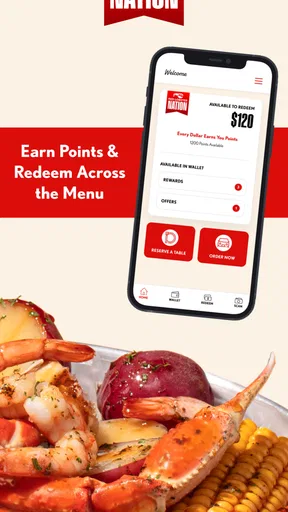
 Analysis by AppCompare
I look at the Red Lobster Dining Rewards App as a practical companion for people who already eat at Red Lobster, rather than as a general-purpose restaurant discovery tool. Its main job is straightforward: it connects qualifying food orders and dining visits with rewards points, giving regular customers a reason to keep their activity in one place. I found that focus useful because it avoids trying to become a complete food app. At the same time, that narrow purpose is exactly what determines whether it deserves space on your phone.
The app is free, aimed at Everyone, and developed by My Red Lobster Rewards. It belongs in the Food & Drink category, and its history goes back to September 2016. That gives it a fairly established place in the mobile dining space, while the current version, 2.0.0, is compatible with Android 7.0 and later. Its average rating is 4.0 from around 17 thousand ratings, with roughly 6.4 thousand written reviews, and it has passed one million installs.
What to consider before relying on the app
My first decision criterion is simple: how often do you actually choose Red Lobster? If the answer is only once every few years, a rewards application may add more maintenance than value. You would need to remember to use it at the right time, check your account, and pay attention to how points connect with your orders or visits. For a regular guest, those small habits can make sense. For an occasional visitor, the benefit may feel too distant.
The second question is whether you prefer restaurant-specific loyalty programs or a broader payment and dining system. A restaurant app can be more relevant when you repeatedly visit the same brand because the rewards are tied to that relationship. A general card-rewards program, bank offer, or multi-restaurant service may be more convenient if your meals are spread across many places. I would not install this expecting it to replace every other food-related app on my phone.
The third criterion is how much control you want over your dining routine. The app is built around earning points when you order food or dine out at Red Lobster. That makes it useful at the moment of purchase, but it does not turn an infrequent diner into a frequent one. The rewards only matter when your actual habits create enough activity to make them worthwhile. I treat that as an important distinction: the app can organize value from visits I was already planning, but it should not be a reason to spend money I would not otherwise spend.
There is also a practical setup question. Before visiting, I would make sure my account is ready and that I understand how I am expected to connect a meal or order with the rewards program. That preparation is more important than it sounds. Loyalty apps are most frustrating when someone remembers them only after paying, when the details of the visit are no longer easy to enter or verify. My best advice is to open the app before ordering, not while standing outside the restaurant afterward.
A realistic dinner scenario
Imagine I am meeting family for dinner on a weekend. We have already chosen Red Lobster, so the restaurant decision is made independently of the app. Before leaving, I open the rewards app and check that I am signed in. During the meal, I keep the rewards step in mind instead of assuming I can fix everything later. Afterward, I look for the points or account activity while the visit is still fresh.
Worth Reading Before You Choose

EA SPORTS FC Mobile 26 Is a Bigger Football Game, but It Takes Time

Flipboard Shows What News Apps Must Do Beyond the Feed

Switching to Android Auto Means Rethinking Your Driving Routine

Google Calendar Makes a Crowded Week Easier to Manage

Ludo King Makes the Most of the Minutes Between Plans

Baby Panda World Brings Quick Play to Modern Phones, but Its Game Library Feels Busy
That workflow is modest, but it is where the application makes sense. It does not need to persuade me to browse dozens of restaurants or compare menus across an entire city. It simply gives a planned Red Lobster visit a second purpose. If I were dining there repeatedly with the same household, I could see the accumulated rewards becoming a pleasant benefit rather than an occasional surprise.
The trade-off is attention. I have to remember the app, use the correct account, and check that the visit has been associated with my rewards activity. Someone who dislikes loyalty programs or does not want another sign-in may reasonably decide that the effort is not worth it. In my experience, the best users are not bargain hunters chasing every possible point; they are customers who already have a recurring connection with this particular restaurant.
Where the app is strongest
The clearest strength is relevance. Instead of presenting generic restaurant content, the app is centered on Red Lobster dining and ordering. That narrow design makes the purpose easy to understand: I open it because I want to manage or benefit from my relationship with this restaurant. For a loyal customer, that is more useful than a broad food app filled with places I may never visit.
Another advantage is that the rewards idea follows the customer across two common situations: ordering food and dining out. I appreciate that distinction because people do not always interact with a restaurant in the same way. One week I may eat at the restaurant with friends; another time I may order food for home. An app that recognizes both types of activity is more practical than one that only serves a single dining format.
The free price also lowers the barrier to trying it. I can install it without making a financial commitment, then decide whether the rewards fit my habits. That is particularly helpful for families who visit Red Lobster occasionally but want to see whether a loyalty account becomes useful over time. The Everyone rating also makes it suitable for a broad household audience, although adults will still be the people making most ordering and account decisions.
I also see value in having a dedicated place to think about rewards before and after a visit. Without an app, loyalty details can be scattered across email messages, receipts, or memory. Keeping the experience attached to the restaurant gives me a clearer routine: open the account before the meal, complete the relevant step, and review the result afterward. That is not a dramatic feature, but it is a meaningful improvement over relying entirely on memory.
Useful habits that are easy to miss
My first practical tip is to use the app as part of the planning stage, not as an afterthought. If I know I am going to Red Lobster, I check the app before leaving home. This gives me a chance to confirm that I am using the intended account and to avoid trying to reconstruct the visit later. It also makes the reward process feel like a normal part of ordering instead of an administrative chore.
My second tip is to separate the dining decision from the rewards decision. I would not choose a more expensive meal simply to earn more points. The healthier approach is to let the app reward a visit I already want. This is an important trade-off with every restaurant loyalty program: a reward has value only when it does not encourage unnecessary spending or extra trips that do not suit my budget.
My third tip is to check activity after both restaurant meals and food orders. Because the program covers these two types of use, it would be easy to remember one and forget the other. I would make a quick review part of my routine after ordering, especially when several people are sharing a meal or when someone else handled the payment. That small check can help me notice whether the account reflects the activity I expected.
A fourth useful habit is to keep expectations realistic when dining with a group. Rewards programs can become confusing when one person orders, another pays, and a third person expects the points. I would decide in advance which account should receive the activity and make sure the transaction is handled consistently. This is less glamorous than earning a reward, but it prevents the kind of confusion that can make a loyalty app feel unreliable.
Where another type of app may fit better
Red Lobster Dining Rewards App is not the right choice for someone looking for a complete restaurant finder. If my priority were discovering independent restaurants, comparing many cuisines, reading broad local recommendations, or coordinating reservations across different brands, I would choose a general dining service instead. This app is too focused for that role, and that is not a flaw as long as I understand its boundaries.
It may also be a poor fit for diners who rarely return to the same restaurant. A cash-back card or broader rewards program could be simpler for someone whose meals are divided among many chains and local businesses. In that situation, the convenience of one universal system may outweigh the relevance of a restaurant-specific account. I would compare the effort of maintaining this app with the number of Red Lobster visits I realistically expect to make.
Frequent delivery users should also think about their preferred ordering routine. The app supports the idea of earning points through food orders, but I would still want to make sure my chosen ordering path connects properly with the rewards account before depending on it. If I usually order through several unrelated services, a dedicated restaurant app may require an extra step. That extra step could be acceptable for a loyal customer, but irritating for someone who values a single checkout experience above everything else.
There is a similar distinction between a rewards app and a menu-planning app. This application is not something I would use to organize weekly groceries, track nutrition, or manage recipes at home. Its value begins with a Red Lobster order or visit. For broader food management, a different category of app would be more appropriate. Choosing it for those unrelated tasks would create disappointment because the product is intentionally centered on loyalty rather than household food planning.
What switching really costs
Moving from no loyalty app to this one is inexpensive in money because the app is free. The real cost is attention: installing it, creating or accessing an account, remembering to use it during eligible activity, and checking the rewards afterward. For me, that cost is low when Red Lobster is already part of my routine. It becomes less attractive when visits are rare or when I already have too many accounts to maintain.
Switching from a general rewards method is more complicated. I would need to decide whether restaurant-specific points are more useful than the simplicity of keeping everything in one broader program. That decision depends on my habits rather than on the app alone. A dedicated account can be more rewarding psychologically because I can see a direct connection between my Red Lobster visits and the benefits, while a universal program may be easier to remember.
I would also avoid changing systems in the middle of a planned meal without checking the details first. The safest workflow is to install and sign in before the visit, understand where the account activity appears, and then use the same account consistently. This is especially important for families, couples, or shared devices. The more people involved, the more useful it is to agree on one account and one routine instead of trying to sort it out after payment.
Device compatibility is another practical consideration. Android users need a device running Android 7.0 or newer. That requirement covers many older phones, but anyone using an aging device should check the operating system before planning around the app. Since the current version is 2.0.0, I would also keep the application updated through the normal app-store process so that I am using the intended release rather than an outdated installation.
My recommendation for different diners
I recommend it most strongly to people who visit Red Lobster with some regularity and are willing to build a simple pre-meal and post-meal habit. For those diners, the application offers a focused way to connect restaurant visits and food orders with rewards. The free price makes testing it easy, and the established user base suggests that it has reached a substantial audience rather than being an obscure experiment.
I would also recommend it to families who often make Red Lobster part of celebrations or group meals. The key benefit is not merely collecting points; it is giving those planned occasions a consistent account history. If one person takes responsibility for opening the app before the meal and checking activity afterward, the process can remain manageable even when several people are ordering.
I would be more cautious with occasional visitors. If I only expect to eat at Red Lobster once in a long while, I would install it only when I have a specific upcoming order or visit. That way, I can test whether the account and rewards routine feel worthwhile without treating it as a permanent part of my dining life. Someone who strongly dislikes account management may prefer to skip it entirely.
My overall view is positive but deliberately narrow. This is not an app I would recommend to every food-app user. It is a targeted loyalty tool for Red Lobster customers, and it does that job more convincingly when the restaurant is already part of their routine. The best reason to use it is not to change your dining habits, but to make existing Red Lobster visits count toward something useful. If that matches the way you eat, I think the free installation is worth trying. If you want restaurant discovery, universal rewards, or broader food planning, another category of app will serve you better.
After using it as a decision rather than an impulse, I would keep it on my phone if I expected recurring Red Lobster orders or meals. I would remove it if several visits passed without a natural reason to open it. That is the fairest test: let your actual dining pattern decide. For the right customer, the app is a convenient bridge between ordering and rewards; for everyone else, its focused nature means there is little reason to force it into a routine it was not designed to support.
Pros
- Earn points on eligible Red Lobster purchases and redeem rewards.
- Mobile ordering can make pickup and dining visits more convenient.
- Digital offers may provide savings for registered members.
- Stores loyalty details and rewards in one easily accessible place.
- Restaurant locator helps find nearby Red Lobster locations.
Cons
- Rewards may expire
- so unused points and offers require regular attention.
- Benefits depend on participating locations and eligible purchases.
- The app is less useful if you rarely visit Red Lobster restaurants.
- Promotional offers can include restrictions
- exclusions
- or minimum spending.
- Account or app issues may make it difficult to access rewards at checkout.
FAQs for Red Lobster Dining Rewards App
What is the Red Lobster Dining Rewards app used for?
The Red Lobster Dining Rewards app is designed to help guests manage their loyalty account and get more value from visits to participating Red Lobster restaurants. After signing in, you can typically view available rewards, track progress, check account activity, and find restaurant information. It is most useful for regular diners who want to keep their rewards details in one place instead of relying on printed offers or remembering separate promotions.
How does the Red Lobster Dining Rewards program work?
The program generally allows members to earn rewards through qualifying purchases made at participating Red Lobster locations, subject to the current program terms. You may need to identify your account during checkout, such as by scanning a membership code or using information connected to your profile. Earning rates, qualifying items, reward values, expiration dates, and exclusions can change, so review the details shown in the app before placing an order or visiting a restaurant.
Can I use the app to order Red Lobster food or make reservations?
App capabilities can vary by location and by the version currently available. The Red Lobster Dining Rewards app primarily focuses on loyalty features, but it may provide access to restaurant details, menus, ordering options, or links to other Red Lobster services. Availability of pickup, delivery, or reservation tools is not guaranteed at every restaurant. Check your selected location in the app to see which services are actually supported in your area.
Are Red Lobster rewards available at every restaurant and on every purchase?
Rewards are usually subject to participating-location rules, eligible purchase requirements, and specific exclusions. Some restaurants, special events, third-party delivery orders, gift card transactions, taxes, gratuities, discounts, or promotional offers may not qualify for points or rewards. Before assuming that a purchase will count, read the offer conditions in the app and confirm the restaurant’s participation. This can help prevent surprises when your account activity is updated.
What should I do if my points or rewards are missing in the app?
First, confirm that you were signed in to the correct account and that the transaction met the promotion’s eligibility requirements. Account activity may not appear immediately, particularly after a busy restaurant visit or when a purchase was made through an unsupported channel. Keep your receipt and note the date, location, and transaction details. If the reward still does not appear after the stated processing period, contact Red Lobster customer support through the official help options.


